






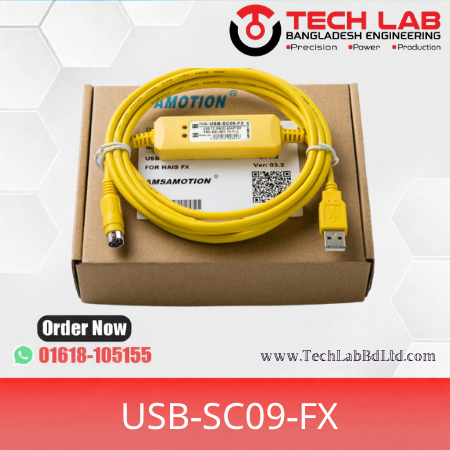
Mitsubishi USB-SC09-FX Cable Price in Bangladesh | PLC Cable
(0
reviews)
- Best Power Analyzer
Share
Mitsubishi USB-SC09-FX PLC Programming Cable – Complete Ecommerce Product Details for Bangladesh
Bangladesh Ecommerce SEO OptimizedCompatible Aftermarket ProductProduct Name: Mitsubishi USB-SC09-FX Programming Cable
Model: USB-SC09-FX
Brand: Mitsubishi Compatible
PLC Series: MELSEC FX Series
Interface: USB to RS-422
Connector: USB-A to 8-Pin Mini-DIN
Application: PLC Programming & Communication
1. Product Overview
The Mitsubishi USB-SC09-FX PLC Programming Cable is a USB-to-RS-422 communication cable designed for connecting a computer or laptop to Mitsubishi MELSEC FX Series PLCs.
This programming cable enables engineers, technicians and automation professionals to upload, download, monitor, troubleshoot and configure Mitsubishi PLC programs using compatible PLC programming software.
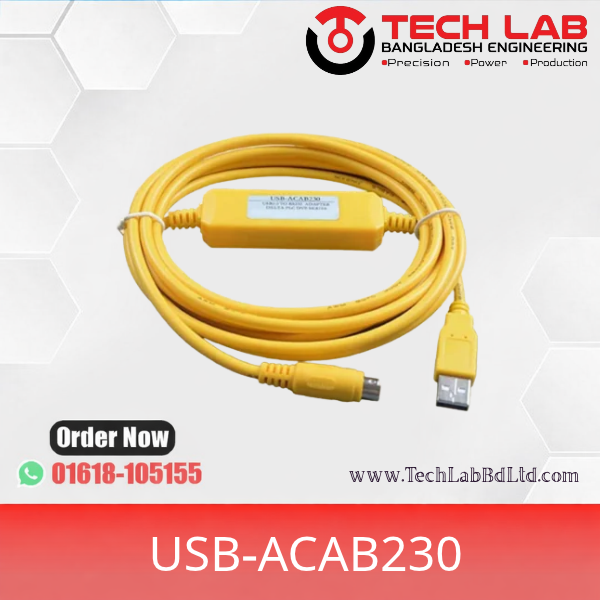
The USB-SC09-FX cable converts the computer's USB interface into a serial communication interface compatible with the Mitsubishi FX PLC programming port. It generally features an 8-pin Mini-DIN connector for PLC communication and LED indicators for transmitting and receiving data.
It is widely used in industrial automation, machine maintenance, factory production lines, PLC training laboratories and control panel servicing.
The cable is available in compatible aftermarket versions and is a popular accessory for Mitsubishi FX Series PLC programming.
Compatible with Mitsubishi – AMSAMOTION+22. Technical Specifications
Specification
Details
Product Brand
Mitsubishi Compatible
Manufacturer
Compatible Cable Manufacturer
Product Name
Mitsubishi PLC Programming Cable
Model Number
USB-SC09-FX
Product Type
PLC Programming Cable
PLC Brand
Mitsubishi Electric
PLC Series
MELSEC FX Series
PC Interface
USB Type-A
PLC Interface
8-Pin Mini-DIN
Communication Interface
USB to RS-422
Communication Protocol
Mitsubishi FX Programming Protocol
USB Standard
USB 1.1 / USB 2.0 compatible versions
Baud Rate
Depends on cable version; commonly 300 bps–1 Mbps advertised
Power Supply
USB Bus Powered
Current Consumption
Approximately 50 mA (version dependent)
LED Indicator
TX / RX
Cable Length
Approximately 2.5 metres
Connector Type
USB-A to Mini-DIN 8-Pin
Driver
USB Serial Driver
Software
GX Developer / GX Works2
Operating System
Windows, depending on driver version
Application
PLC Programming, Upload & Download
Product Condition
New
Warranty
As per supplier policy
Note: These are commonly advertised compatible-cable specifications. Chipset, driver, cable length and maximum baud rate can differ between manufacturers.
Mitsubishi Electric - TechonicsLTD.com+23. Compatible Mitsubishi PLC Models
PLC Brand
PLC Series
Compatibility
Mitsubishi
FX0
Compatible
Mitsubishi
FX0S
Compatible
Mitsubishi
FX0N
Compatible
Mitsubishi
FX1S
Compatible
Mitsubishi
FX1N
Compatible
Mitsubishi
FX2
Version/port dependent
Mitsubishi
FX2N
Compatible
Mitsubishi
FX2NC
Version/port dependent
Mitsubishi
FX3G
Port dependent
Mitsubishi
FX3U
Compatible
Mitsubishi
FX3UC
Port dependent
Important compatibility note: This cable is intended for FX PLCs equipped with the compatible 8-pin programming port. Verify the CPU's connector and communication requirements before ordering. Not every Mitsubishi PLC uses the same programming cable.
samelectric.ru+24. Main Product Features
USB to RS-422 Communication: Connects a laptop or desktop computer to compatible Mitsubishi FX PLCs.
8-Pin Mini-DIN Connector: Designed for the programming port found on compatible FX Series PLCs.
LED Communication Indicators: TX and RX indicators help monitor data transmission and reception.
USB Bus Powered: Does not normally require an external power supply.
USB Serial Port Conversion: Creates a virtual COM port on the computer after driver installation.
PLC Program Transfer: Supports uploading and downloading PLC programs through compatible software.
Industrial Maintenance: Suitable for factory automation, machine servicing and PLC troubleshooting.
samelectric.ru+25. Supported PLC Programming Software
Software
Compatibility
GX Developer
Supported
GX Works2
Supported on compatible cable versions
GX Works3
Not guaranteed; verify PLC and cable support
FXGP/WIN
Depends on cable driver/version
SWOPC-FXGP/WIN-C
Not supported by some USB-SC09-FX versions
Software note: USB-SC09-FX compatible cable versions differ in driver and software support. Confirm the cable chipset and driver before purchasing.
Compatible with Mitsubishi – AMSAMOTION+26. Applications
Mitsubishi FX PLC programming.
PLC program upload and download.
Online PLC monitoring.
PLC troubleshooting and maintenance.
Industrial machine automation.
Factory production line maintenance.
PLC control panel servicing.
Motor control system programming.
Industrial automation training.
Machine installation and commissioning.
7. Installation & Connection Procedure
Install the USB-SC09-FX compatible driver on your computer.
Connect the USB-A connector to your laptop or desktop.
Connect the 8-pin Mini-DIN connector to the Mitsubishi FX PLC programming port.
Open Windows Device Manager.
Check the assigned USB Serial COM port.
Open GX Developer or GX Works2.
Select the appropriate serial COM port and PLC communication interface.
Establish communication with the PLC.
Start uploading, downloading or monitoring the PLC program.
8. Product Identification & Ordering Information
Field
Information
Brand
Mitsubishi Compatible
Model
USB-SC09-FX
Alternative Search Model
USB SC09 FX
Product Category
Industrial Automation
Subcategory
PLC Programming Cable
PLC Manufacturer
Mitsubishi Electric
PLC Family
MELSEC FX
Communication
USB / RS-422
Connector
USB-A / Mini-DIN 8-Pin
Product Type
Programming & Communication Cable
Country of Origin
Verify supplier/manufacturer
Warranty
As per supplier
Stock Availability
Subject to stock confirmation
9. Recommended Ecommerce Product Variations for Bangladesh
Variation
Product Description
Standard USB-SC09-FX
Standard compatible programming cable
Premium USB-SC09-FX
Upgraded cable with improved connector and shielding
USB-SC09-FX FTDI Version
Version using FTDI USB serial chipset
USB-SC09-FX CH340 Version
Version using CH340 USB serial chipset
USB-SC09-FX with Driver
Cable supplied with compatible driver
Purchasing recommendation: FTDI and CH340 versions require different drivers. Confirm the actual chipset before listing the product or dispatching it.
Compatible with Mitsubishi – AMSAMOTION10. Bangladesh Market Pricing & Selling Strategy
For your Bangladesh ecommerce store, use these product fields:
Pricing Information
Recommended Entry
Currency
BDT (৳)
Market
Bangladesh
Regular Price
Update according to supplier quotation
Special Price
Optional promotional price
Warranty
As per supplier
Delivery
Nationwide Bangladesh
Availability
In Stock / Out of Stock
Login Or Registerto submit your questions to seller
No none asked to seller yet

At Tech Lab Bangladesh Engineering, we are dedicated to transforming industries through cutting-edge
automation solutions. Tech Lab Bangladesh Engineering Has
Expert team to provide Efficient and Economic Solution.
House 143 (Level-03 & 04), Road 16 (Near by Kamarpara Bus Stand), Sector 10,Uttara, Dhaka-1230
01618105155 / 01885407069
Subscribe to our newsletter for regular updates about Offers, Coupons & more